


Today, we officially announce the release of KubeSphere Community Edition — a free forever container management platform designed for developers and small-to-medium teams. This marks a major milestone in KubeSphere’s product strategy — representing a concrete step toward lowering the barriers to cloud-native adoption and serving a broader user base.
Four Key Advantages — Free, Yet Enterprise-Ready
Free Forever, Enterprise-Grade Experience
Zero cost, no hidden fees. KubeSphere Community Edition is permanently free and requires no licensing fees, allowing startups, small businesses, and growing teams to enjoy the benefits of cloud-native technology equally.
But free doesn’t mean limited in capability. The Community Edition provides long-term support and continuous iteration at the same level as enterprise offerings. All features are battle-tested across industries, giving your business a reliable cloud-native foundation. We believe accessibility and quality can coexist.
Easy Installation and Immediate Usability
Flexible deployment, adaptable to all environments. KubeSphere Community Edition supports public cloud, private cloud, and bare metal environments, ensuring seamless compatibility across infrastructures. Whether you’re deploying in a data center, on cloud servers, or on-prem hardware, it runs effortlessly.
Lightweight and beginner-friendly. The platform offers a streamlined installation process that dramatically simplifies Kubernetes cluster setup and management. No complex scripts or pre-configurations are required—installation takes just minutes, allowing your team to focus on development and operations faster.
Open Architecture, Unlimited Extensibility
Pluggable design and ecosystem compatibility. KubeSphere Community Edition features a highly modular architecture with a UI/API that supports dynamic extensions. You can enable only the extensions you need—keeping the system lightweight and efficient.
Even better, KubeSphere integrates seamlessly with numerous open-source tools, empowering you to extend capabilities and build a cloud-native operating system that best fits your team.
Full-Featured, Cloud-Native Foundation
KubeSphere Community Edition includes the core capabilities for building and managing a cloud-native container platform:
- Unified Management: Multi-cluster management, fine-grained RBAC, and tenant isolation for enterprise-grade governance.
- Powerful Observability: Multi-dimensional monitoring, alerting, and notification systems for rapid troubleshooting.
- Efficient Operations: Full application lifecycle management, DevOps pipelines, and flexible storage/networking solutions.
Extensions: Covering Key Scenarios
KubeSphere Community Edition includes 16 carefully curated extensions, covering observability, DevOps, security, AI inference, service gateway, and database management:
Observability Stack
- WizTelemetry Platform Service
- WizTelemetry Monitoring
- WizTelemetry Alerting
- WizTelemetry Notification
- WizTelemetry Data Pipeline
- Metrics Server
Gateway & Traffic Management
- KubeSphere Gateway
- Higress (Cloud-Native API Gateway)
DevOps & Continuous Delivery
- DevOps (Full CI/CD Pipeline)
Security & Compliance
- Gatekeeper (Policy Engine)
- cert-manager (Certificate Management)
AI and GPU Support
- NVIDIA GPU Operator
- DeepSeek (AI Inference)
Data Management & Storage
- ob-operator (OceanBase Operator)
- oceanbase-dashboard (OceanBase Management Console)
- Fluid (Dataset Orchestration and Acceleration)
These integrations aren’t simple “bundles” — they’re deeply tested and optimized for plug-and-play use within KubeSphere. Each extension can be installed from the Extension Center with one click, reducing learning and maintenance overhead.
Quick Start
Installation & Upgrade
Online Installation
If you are starting from scratch, follow the Install Kubernetes and KubeSphere Online Guide to deploy KubeSphere in an internet-accessible environment.
If Kubernetes is already installed, you can install KubeSphere directly via Helm. Refer to the Install KubeSphere documentation for steps.
Upgrade from Open Source Edition to Community Edition
If you already use the open-source version of KubeSphere and wish to upgrade, note the following:
Usage recommendation: For optimal experience, the Community Edition supports up to 128 vCPU per cluster. Beyond that, the system enters read-only mode (view-only access).
Before upgrading:
- Follow the upgrade guide to run the cluster-size check script.
- Verify dependency versions according to the documentation.
Refer to Upgrade from KubeSphere Open Source to Community Edition v4.2.0 for details.
License Activation
Step 1: Retrieve Cluster ID
After installing KubeSphere, navigate to Component Dock → Platform Settings → Licenses to find your Cluster ID.

Step 2: Apply for Free License
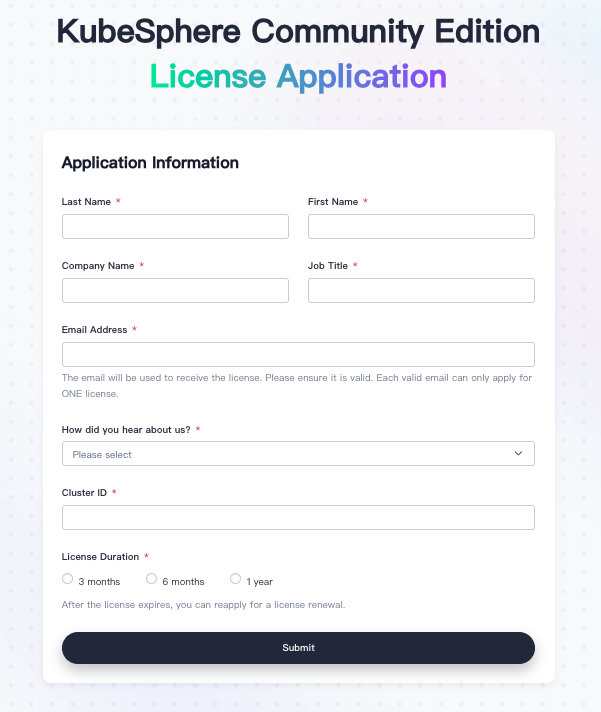
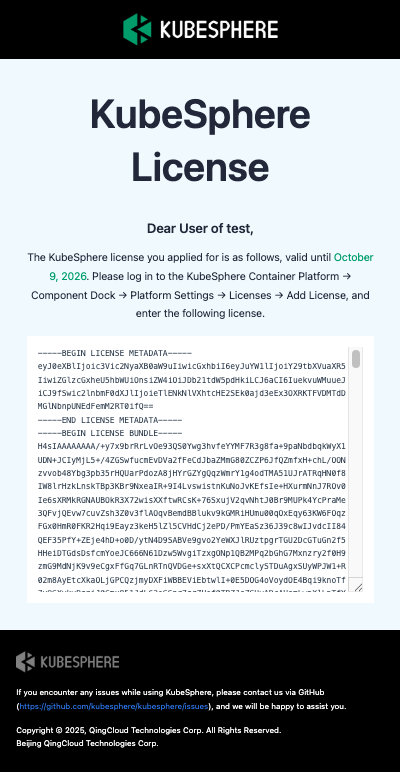
Go to Apply for a Free KubeSphere Community License, fill in your information and Cluster ID, and submit. The license key will be sent to your email (check your spam folder if you don’t receive it).
Step 3: Add License
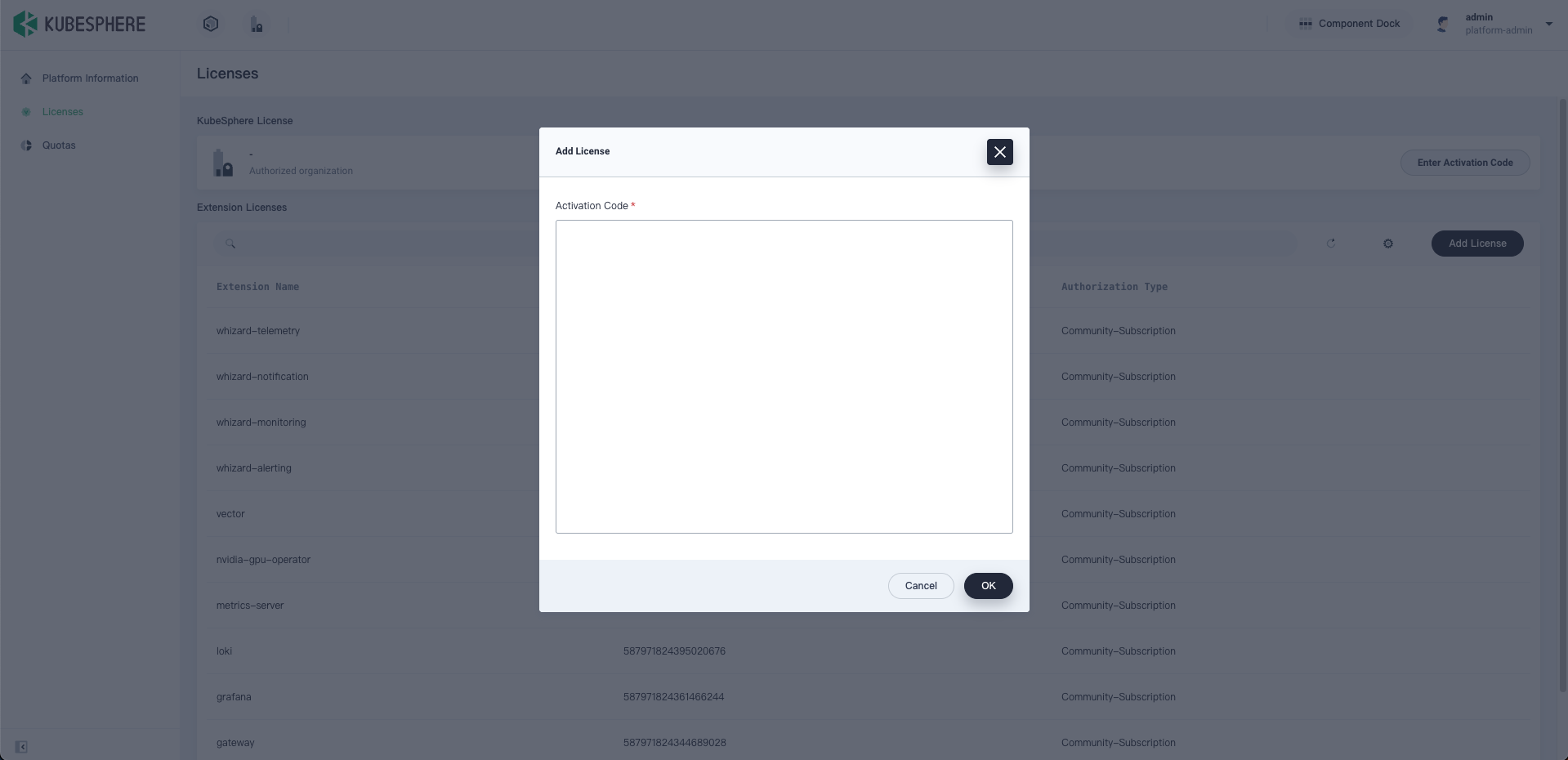
Copy the authorization code from the email, go to Component Dock → Platform Settings → Licenses, click Add License, and paste the code to activate.
Your KubeSphere Community Edition is now ready to use!
Why Choose KubeSphere Community Edition?
Truly Zero Barrier
No purchase or approval required — start your cloud-native journey immediately.
Production-Grade Reliability
Built on Kubernetes best practices and validated by enterprise users, stable and ready for production.
Smooth Upgrade Path
As your business grows, simply switch your license to upgrade to the Enterprise Edition for advanced features and support.
Start Your Cloud-Native Journey Today
Unlock the full potential of Kubernetes with KubeSphere Community Edition — the easiest way to manage your cloud-native applications efficiently!
