


OpenClaw has already become a daily AI assistant for many users, but it does not understand KubeSphere’s unique resource model or operational workflows.
Ask it about multi-cluster management, and it gives you generic kubectl commands. Ask about DevOps pipelines, and it explains how to use upstream Jenkins. Ask about extension installation, and it falls back to the usual Helm Chart approach. None of these reflects how KubeSphere users actually get work done.
Now, KubeSphere Skills are officially available, filling in the long-missing KubeSphere-specific capabilities in OpenClaw.
What Skills Have We Released?
KubeSphere Skills currently includes 16 skill packages, covering three major areas: the core platform, the full DevOps workflow, and the observability stack.
1. Core Platform Capabilities
| Skill | Coverage | Typical Use Cases |
|---|---|---|
kubesphere-core | KubeSphere core platform architecture | Using KubeSphere core features and extension mechanisms |
kubesphere-extension-management | Extension lifecycle management | Installing, configuring, upgrading, or troubleshooting extensions |
kubesphere-cluster-management | Cluster queries (read-only) | Querying cluster lists, status, details, and version information |
kubesphere-multi-tenant-management | Multi-tenant management | Workspaces, namespaces, roles, and access control |
2. End-to-End DevOps Workflow
| Skill | Coverage | Typical Use Cases |
|---|---|---|
kubesphere-devops-overview | Overall DevOps extension architecture | DevOps setup, architecture understanding, and general CI/CD operations |
kubesphere-devops-pipeline | Pipeline management | Creating, running, and monitoring CI/CD pipelines through APIs |
kubesphere-devops-credentials | Credential management | Managing repository and deployment credentials |
kubesphere-devops-jenkins | Jenkins configuration | Jenkins configuration, agent management, authentication, and troubleshooting |
kubesphere-devops-tenant | Tenant operation conventions | Standardizing namespace-scoped DevOps operations |
kubesphere-devops-argocd | Argo CD integration | GitOps application deployment and management |
3. Observability Suite
| Skill | Coverage | Typical Use Cases |
|---|---|---|
whizard-telemetry | Public services of the WizTelemetry platform | Providing the common API server for observability extensions such as logging, auditing, and events |
vector | Observability data collection and routing | Configuring data pipelines for logs, events, audits, and more |
opensearch | Observability data storage and retrieval | Storing and querying logs, events, audits, and notification history |
whizard-logging | Logging capability | Collecting Kubernetes container logs |
whizard-events | Event capability | Collecting Kubernetes events |
whizard-auditing | Auditing capability | Collecting Kubernetes and KubeSphere audit events |
These Skills encapsulate the correct resource models, installation constraints, API paths, dependencies, and troubleshooting approaches into professional capabilities that AI can invoke directly.
What Can OpenClaw Do After Loading These Skills?
Once KubeSphere Skills are loaded, OpenClaw no longer outputs a generic K8s or DevOps solution. Instead, it begins to understand questions through KubeSphere’s own resource model, installation mechanisms, and operational workflows, and can provide answers that are much closer to real-world usage.
Scenario 1: Cluster and Multi-Tenant Management
Without the corresponding Skill, AI usually can only offer some generic Kubernetes query commands, such as:
kubectl get nodes
kubectl get pods -A
kubectl get namespaces
After the Skill is loaded, you only need to say:
List all clusters and tell me the Kubernetes version of each cluster, as well as whether it is a Host or Member cluster.
It can then understand the request based on KubeSphere’s cluster model, recognize the cluster CRD, distinguish Host and Member clusters by their labels and roles, and provide a more accurate query method instead of stopping at generic Kubernetes commands.
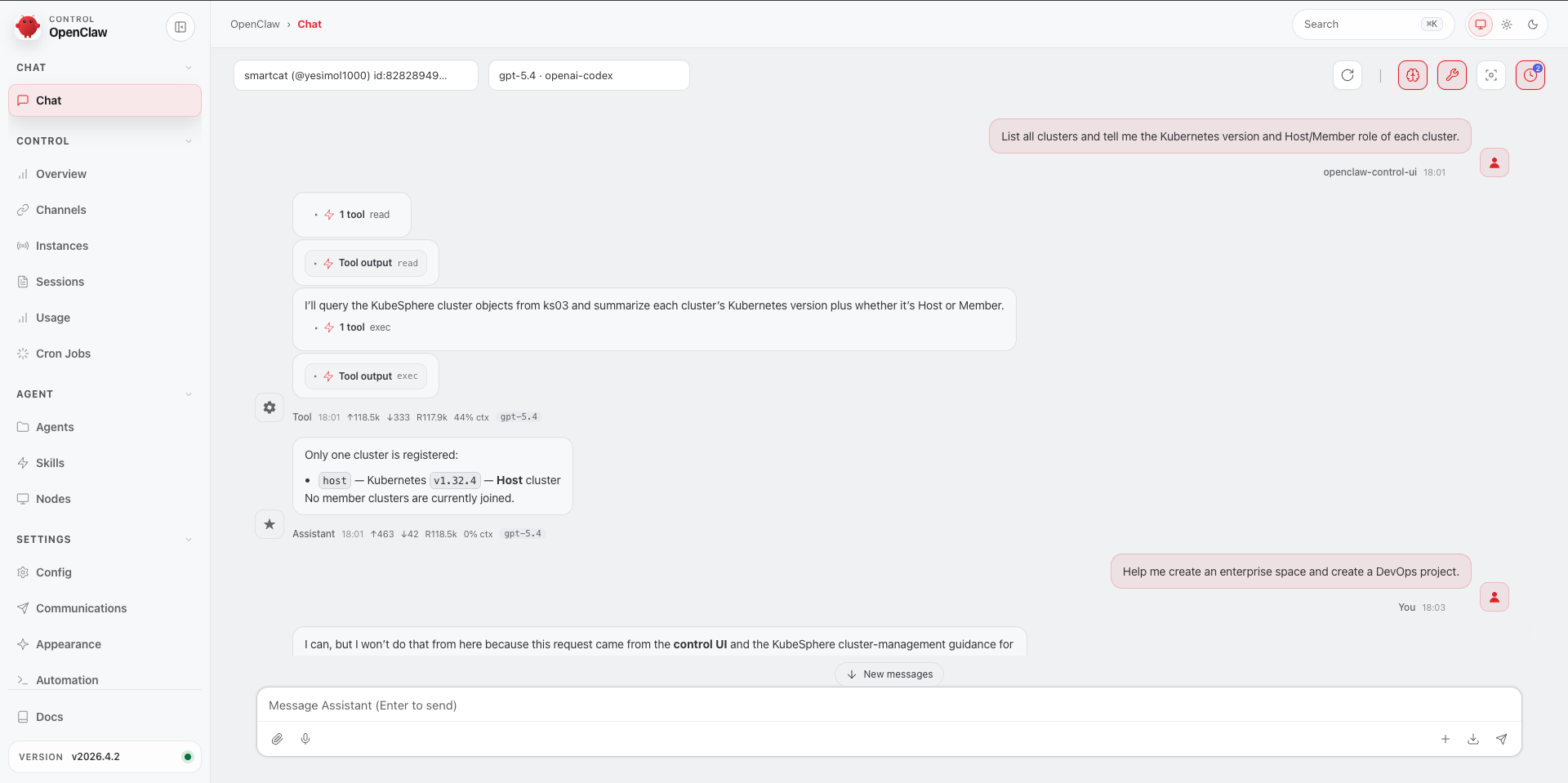
What previously required opening the console and clicking through cluster details one by one can now be done in a single conversation round, with results that are more structured and better suited for further filtering or scripting.
Scenario 2: Extension Installation
Without the Skill, AI often follows generic conventions and suggests deploying directly with Helm Charts, for example:
helm install xxx
But in KubeSphere 4.x, extensions have their own explicit installation mechanism, and the correct entry point is not a simple helm install command.
After loading the Skill, when you tell it:
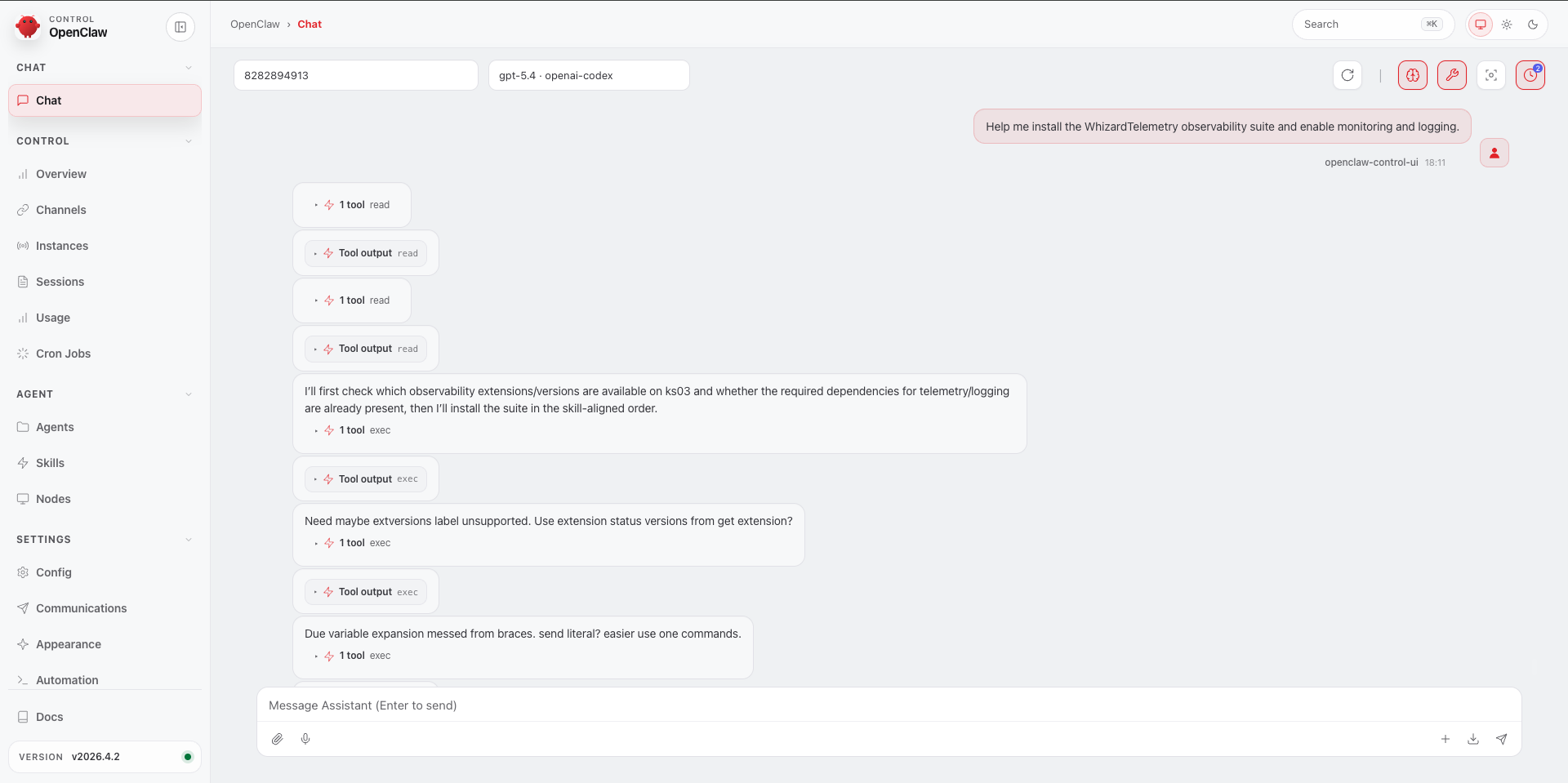
Help me install the WhizardTelemetry observability suite with monitoring and logging enabled.
it immediately switches into the correct KubeSphere installation context and generates installation content that matches KubeSphere’s requirements. The screenshots below show how OpenClaw goes from identifying the installation request to generating configuration content that conforms to KubeSphere’s extension mechanism.
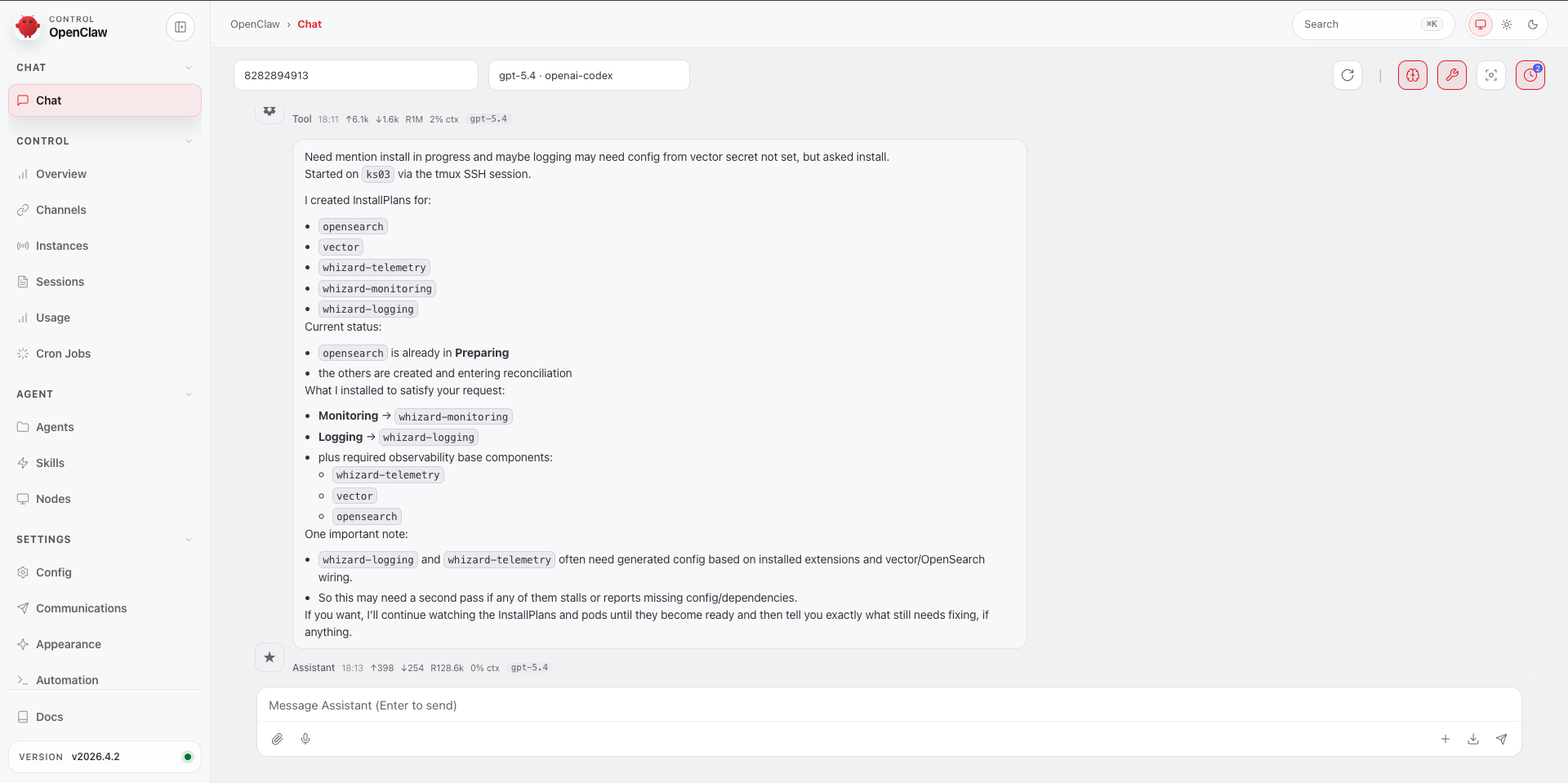
Now AI remembers all of these installation details.
Scenario 3: DevOps Project Management
Without the corresponding Skill, this kind of task usually requires creating resources step by step in the console and then manually completing the permission bindings. A seemingly simple request like “create a project” often involves at least the following steps:
1. Create a workspace
2. Bind an administrator
3. Select the target cluster
4. Create a DevOps project
5. Go to member management
6. Assign roles
After loading the Skills, you can simply say:
Help me create a workspace and a DevOps project.
OpenClaw will first identify the key parameters that still need to be supplied, then connect workspace creation, project creation, and role authorization into one complete workflow.
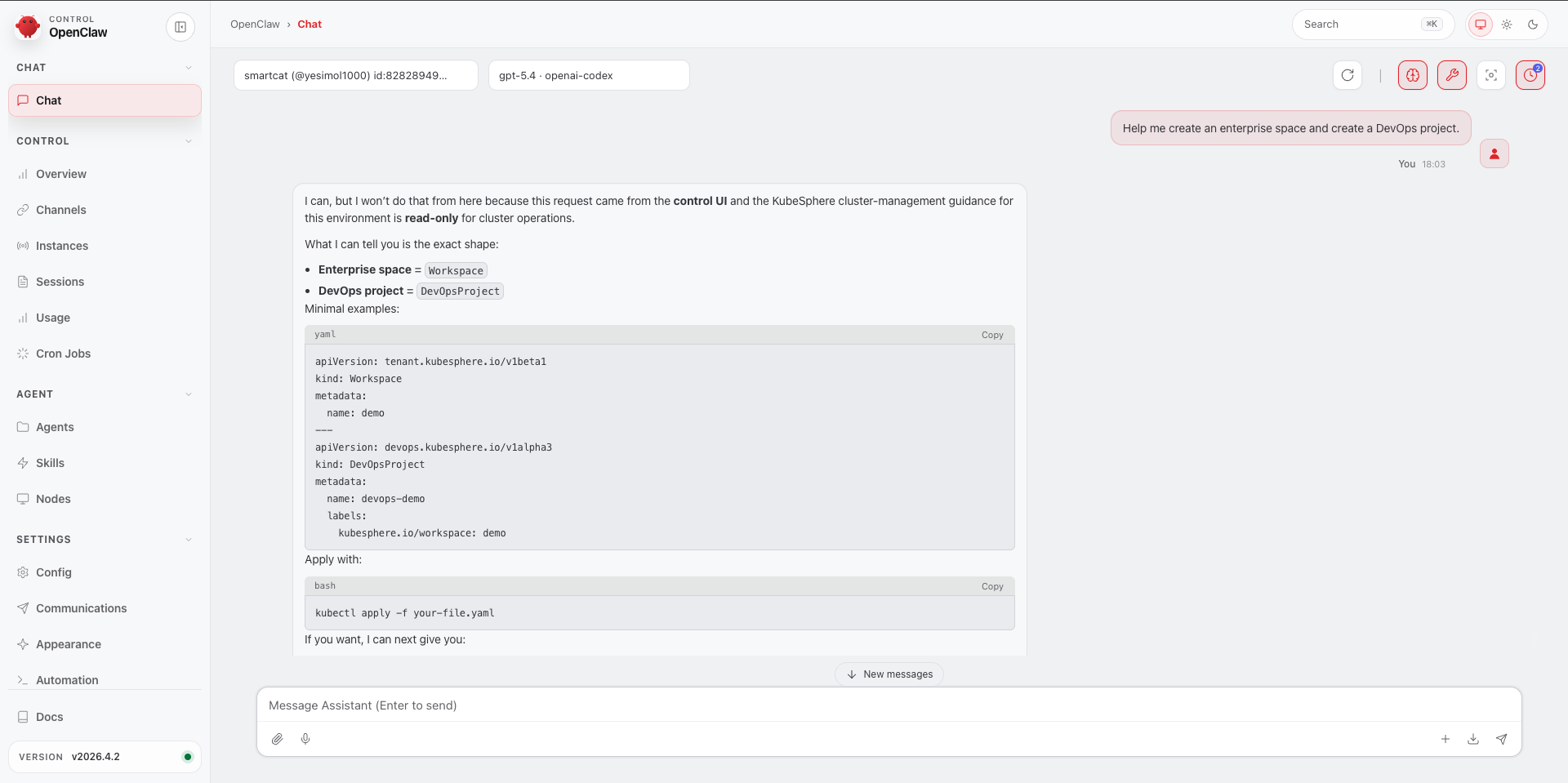
In this way, AI is no longer just “helping you create a project.” It understands that a DevOps project belongs to a workspace, is constrained by tenant boundaries, and requires role authorization before it can actually be used.
KubeSphere Skills vs. Traditional GUI
These two working modes suit different scenarios. Here is a comparison:
| Scenario | Traditional GUI Workflow | OpenClaw + KubeSphere Skills |
|---|---|---|
| Install an extension | Go to Extension Marketplace → select the extension → fill in the configuration form → wait for installation | Start a conversation: “Help me install WhizardTelemetry” → AI generates the correct InstallPlan YAML → run kubectl apply and you’re done |
| Check multi-cluster status | Go to Cluster Management → open clusters one by one to inspect details | Ask: “List all clusters and their Kubernetes versions” → get structured results immediately, with support for further filtering |
| Create a workspace and grant permissions | Go to workspace management → create workspace → member management → role binding, at least 5 steps | Describe the requirement in one sentence, and AI outputs a complete API call sequence following the principle of least privilege |
| Trigger a DevOps pipeline | Go to the DevOps project → pipeline → run manually | AI generates a PipelineRun CR that can be applied directly, enabling immediate triggering and scriptable batch execution |
| Deploy a GitOps application | Open the GitOps page → manually fill in repository URL, path, and sync strategy | AI outputs KubeSphere tenant-friendly GitOps API calls, without requiring direct interaction with the argocd namespace |
| Troubleshoot observability issues | Switch to monitoring → filter by tenant → inspect alert rules → review logs | Directly ask: “Show alerts in the production namespace from the past hour” → AI provides the precise API query path |
Skills mainly bring three changes: efficiency, accessibility, and extensibility.
Start Using Them Now
KubeSphere Skills has been open-sourced and is now available. Installation is very simple, and it supports mainstream AI agent ecosystems.

Recommended: One-Click Installation with npx
npx skills add kubesphere/kubesphere
This command detects the installable Skills in the repository and writes them into the current agent environment according to the agent’s installation method.

Or let your agent install them through conversation:
Simply tell your AI assistant:
Please help me install the skills from https://github.com/kubesphere/kubesphere
Once the installation is complete, your AI assistant will have the full knowledge of the KubeSphere platform loaded and will be ready to use immediately.
Community contributions are also welcome. If you find that a certain operational scenario is missing a corresponding Skill, or if there is room to improve the description of an existing Skill, you can submit changes according to the repository’s contribution guide, including stress scenarios, API examples, and actual troubleshooting steps.
Project repository: https://github.com/kubesphere/kubesphere/tree/master/skills
From Clicking to Conversing
What KubeSphere Skills does is actually very simple: it enables OpenClaw to truly understand KubeSphere.
From now on, you no longer need to dig through menus to check clusters, remember forms to install extensions, or open the console to trigger pipelines. A conversation is enough.
If you encounter a scenario that is missing a corresponding Skill, or think something could be improved, feel free to submit it through the contribution guide. Every piece of feedback you provide will make KubeSphere’s AI capabilities even stronger.
